QA
QA is responsible for performing sprint feature testing, release testing as well as exploratory testing.
Below are some documents that are helpful when testing Minds:
- Test Outline: https://docs.google.com/document/d/1VcemFBwoea7fcie-sMgpC1KuwokIzY0JJ3d1cuaHSWk/edit?usp=sharing
- Minds QA Workflow - Web: https://whimsical.com/minds-qa-workflow-web-X7wWFP5GVd2Vc3ewCfq5kY
- Minds QA Workflow - Mobile: https://whimsical.com/minds-qa-workflow-mobile-AAdMdeEJESa23ciNhDXUez
- Minds Supported Platforms: https://developers.minds.com/docs/guides/platforms/
- GAT Testing: https://app.globalapptesting.com/ (Depreciated)
Manual Testing
WEB:
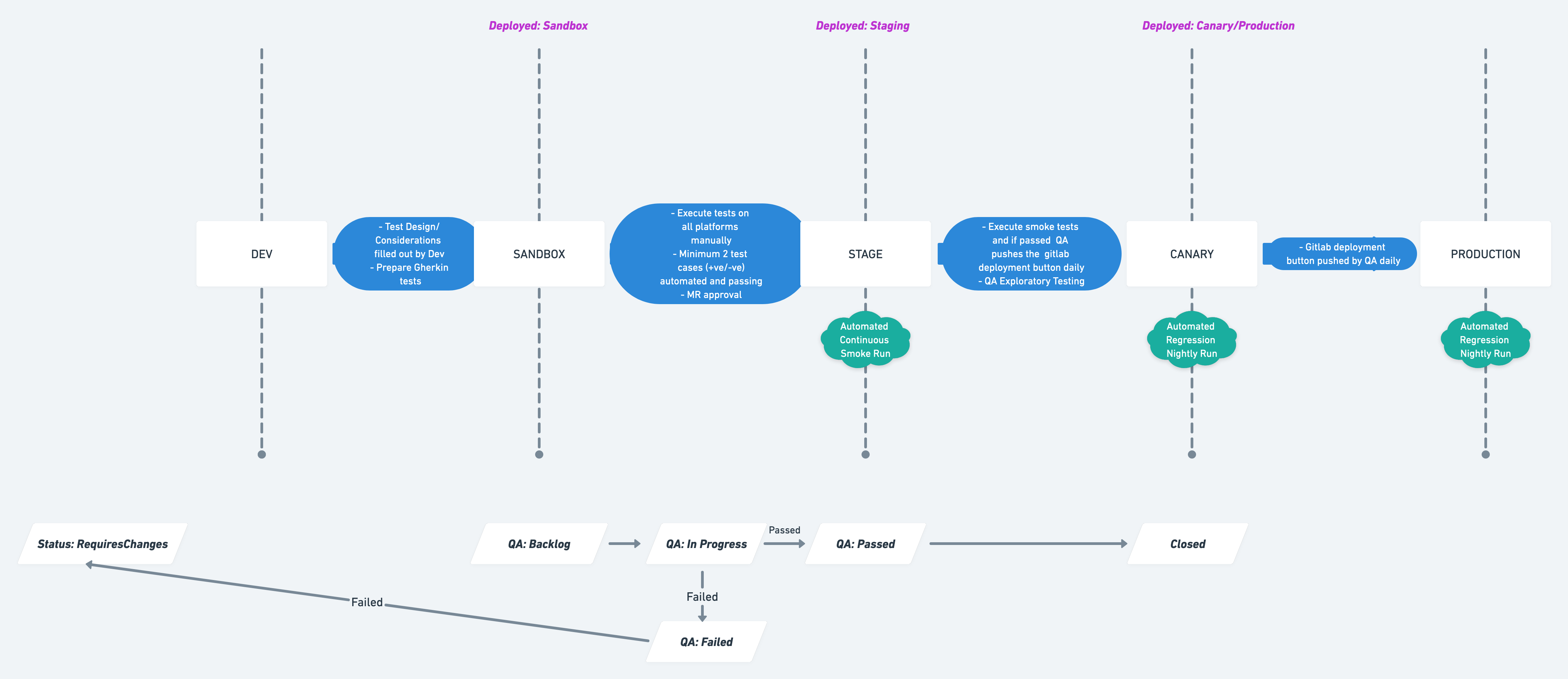
Below is the testing process workflow diagram for web releases:
MOBILE:
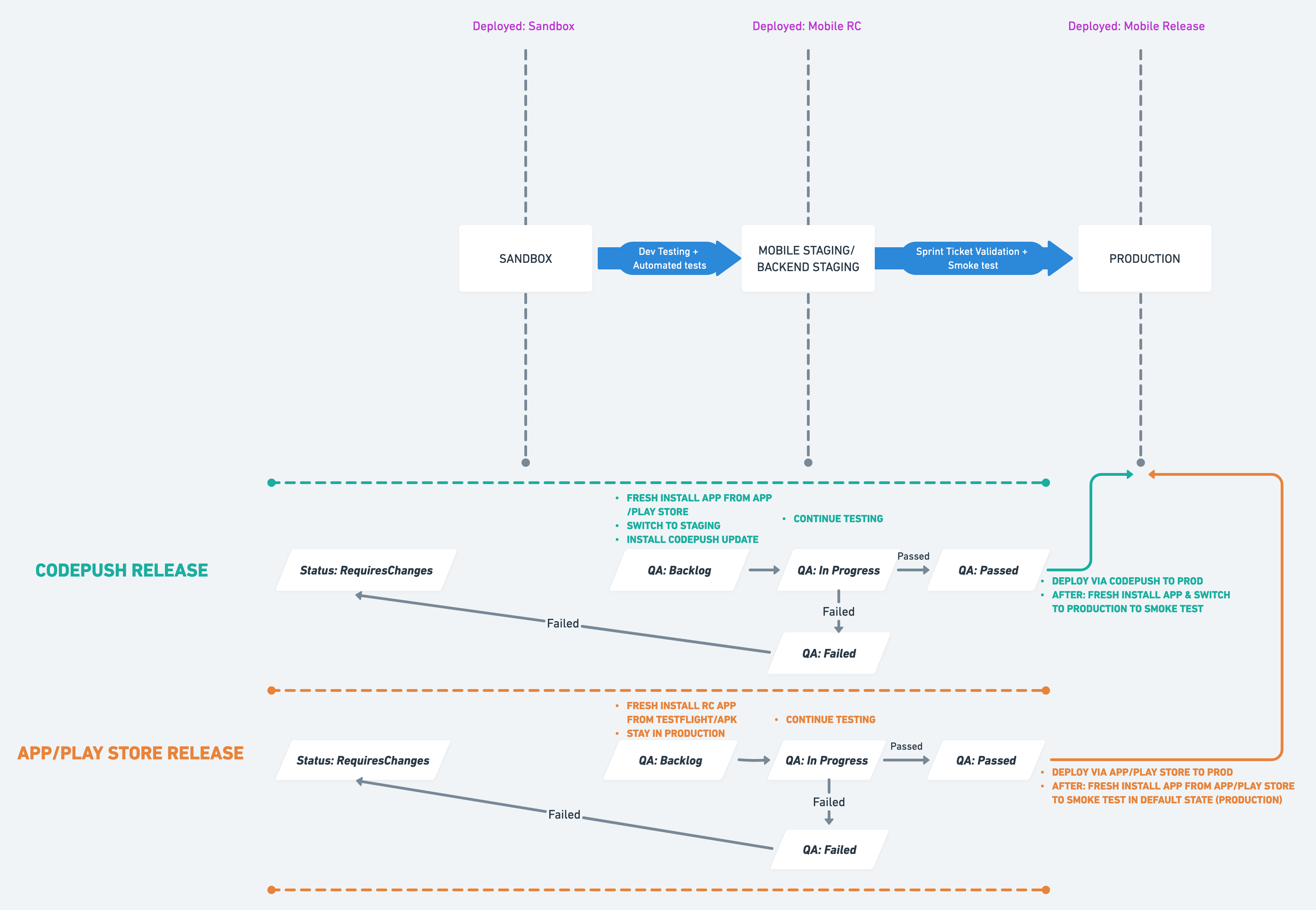
Below is the testing process workflow diagram for codepush and app/play store mobile releases:
Web Automation Framework
Playwright end-to-end test automation with CodeceptJS (Gherkin) and Browserstack.
Key Integrations:
- Playwright + CodeceptJS + BrowserStack
- Page Object Model
- Gherkin
- Gitlab CI
- Parallel execution
- Platform: Chrome, Firefox, Webkit
Dependencies:
Pre-requisites: Install latest version of Node, web browsers and create environment variables.
Node: https://nodejs.org/en/download/
Environment variables for Playwright Tests:
E2E_DOMAIN, PLAYWRIGHT_USERNAME & PLAYWRIGHT_PASSWORD
Environment variables for BrowserStack Connection:
BROWSERSTACK_USERNAME & BROWSERSTACK_ACCESS_KEY
Run Command:
Run this command within the project to install all package.json dependencies:
cd e2e/test
yarn
Run the command below to execute automation locally on a headless Chrome browser:
yarn run test:e2e:local
Run the command below to execute automation on Browserstack on Chrome, Firefox & Webkit browsers in parallel:
yarn run test:e2e:real
*In case of errors, check screenshots saved under e2e/test/error-screenshots folder.
Creating New Tests:
To create a new suite of tests:
- Create a Feature file (to define gherkin features and scenarios).
- Create a Steps file (to define individual Steps - Given/When/Then).
- Create a Page file (to define common functions and variables).
- Ensure that all the files above are linked via codeceptjs config file.
Helpful Links:
For more on how to write tests in CodeceptJs + Gherkin click hereFor more on how to user locators with CodeceptJS click here For more on using CodeceptJS UI click hereFor more on Playwright click here
Mobile Automation Framework
WebdriverIO end-to-end test automation with Browserstack.
Key Integrations:
- Platform: iOS & Android
- Frontend Framework: WebdriverIO Node.js
- Frontend Testing Framework: Jasmine
- Reporter: Spec
- Integrations: BrowserStack Real Devices, CI (TBD) & Suite Setup (TBD)
Dependencies:
Pre-requisites: Install latest version of Node and create environment variables.
Node: https://nodejs.org/en/download/
Environment variables for WebdriverIO Tests:
USERNAME & PASSWORD
Environment variables for BrowserStack Connection:
BROWSERSTACK_USERNAME, BROWSERSTACK_ACCESS_KEY, BROWSERSTACK_IOS_APP_ID & BROWSERSTACK_ANDROID_APP_ID
Run Command:
Run this command within the project to install all package.json dependencies:
yarn
Run the command below to execute automation on BrowserStack iOS & Android real devices respectively:
yarn run test:real:ios
yarn run test:real:android